Tailor the customer fields
- Version
- 3.x
- Updated
Audience: store admins · Scope: the Customer Fields matrix · Last reviewed: 2026-07-20
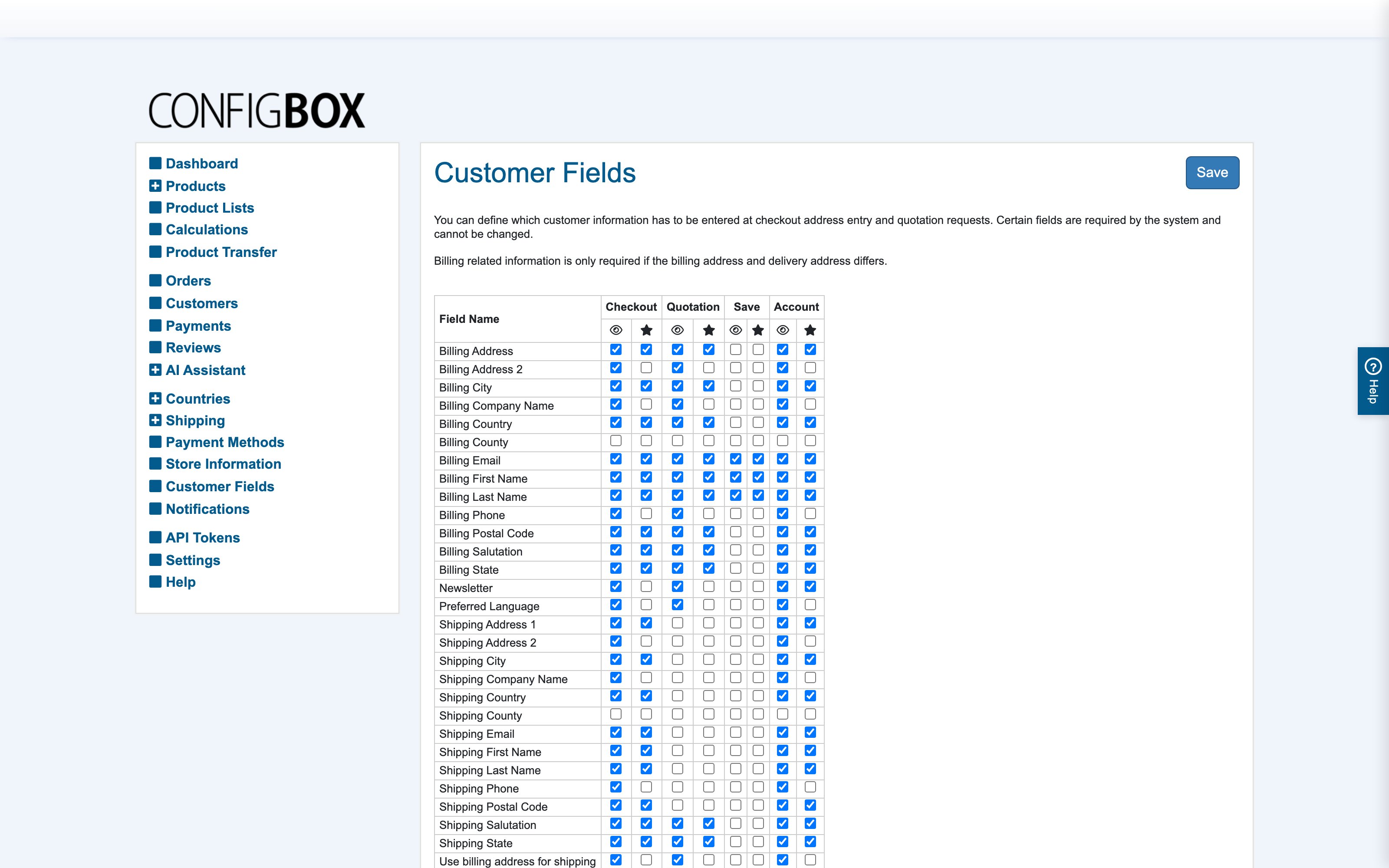
What this does — Controls exactly what personal data you collect, and when. For every customer/address field, you decide separately in each of four flows whether it is shown and whether it is required — so checkout can demand more than a quick quotation request, and the profile can stay lean.
How to read the matrix
Each row is a field (company, salutation, name, address lines, ZIP, the country/state chain, VAT number, phone, language, newsletter …). The columns pair show and require for each flow:
- Checkout — the buying flow (billing and delivery sections).
- Quotation — the request-a-quote flow.
- Save Order — saving a cart for later.
- Profile — the account-editing screen.
Tick show to render the field in that flow; tick require to block submission while it's empty. A field can be required at checkout, optional in the profile, and absent from quotations — that's the point.
Steps
- Go to Customer Fields.
- Walk each flow column asking one question: do we truly need this, here? Every required field costs conversion; quotations especially deserve a short form (name + email often suffices — you're starting a conversation, not shipping a parcel).
- Save, then run each flow on the storefront once to feel the result.
Worked examples
- B2B store: require Company and VAT IN at Checkout; show both, required, in Quotation; hide the salutation everywhere.
- Consumer store: hide Company and VAT IN everywhere; require only name, address and email at Checkout; Quotation shows name + email only.
Good to know
- Delivery-address fields appear when the customer unticks "same as billing" — their show/require switches live in the same matrix. Whether the delivery block starts expanded is a Settings → Checkout switch.
- The country → state → county → city dropdowns only offer populated, active geography records — if a state dropdown looks empty, that's the geography screens, not this matrix.
- Salutation options (Mr/Ms/…) are managed in the embedded Salutations manager in Settings; this matrix only decides whether the field shows.
- Requiring the VAT number is what enables clean EU B2B reverse-charge handling — pair it with the country flags from taxes.