Let customers use their own AI assistant
- Version
- 3.x
- Updated
Audience: store owners and shop managers · Scope: letting customers shop your store through their own AI assistant, and what you and they can see and control · Last reviewed: 2026-08-26
What this does — Your customers can hand your store to the AI assistant they already use, and say things like "find me a linear luminaire for a 24-foot run in 4000K and put it in my cart." The assistant browses your catalog, works through the product's questions, respects every rule you have written, sees the price their customer group is allowed to see, and fills their cart. Then it gives them a link to open that cart in your shop and pay.
This is the opposite direction from the AI product assistant on your configurator pages. That one is yours — your model, your prompt, your bill. This one is theirs: they bring the assistant, they pay for it, and your store is simply one of the things it can use.
What you need
- A store on a public web address, reachable over https.
- Nothing else. The door ships with CBX and is already open — there is nothing to install and nothing to switch on. The settings below exist to narrow it, not to enable it.
What to give a customer
One web address:
https://your-store.example/cbx-api/mcp
That is all. Their assistant works out the rest by itself: it asks the store how to get permission, sends the customer to a sign-in page, and takes it from there.
What the customer goes through, once
-
They add your store's address to their AI tool.
-
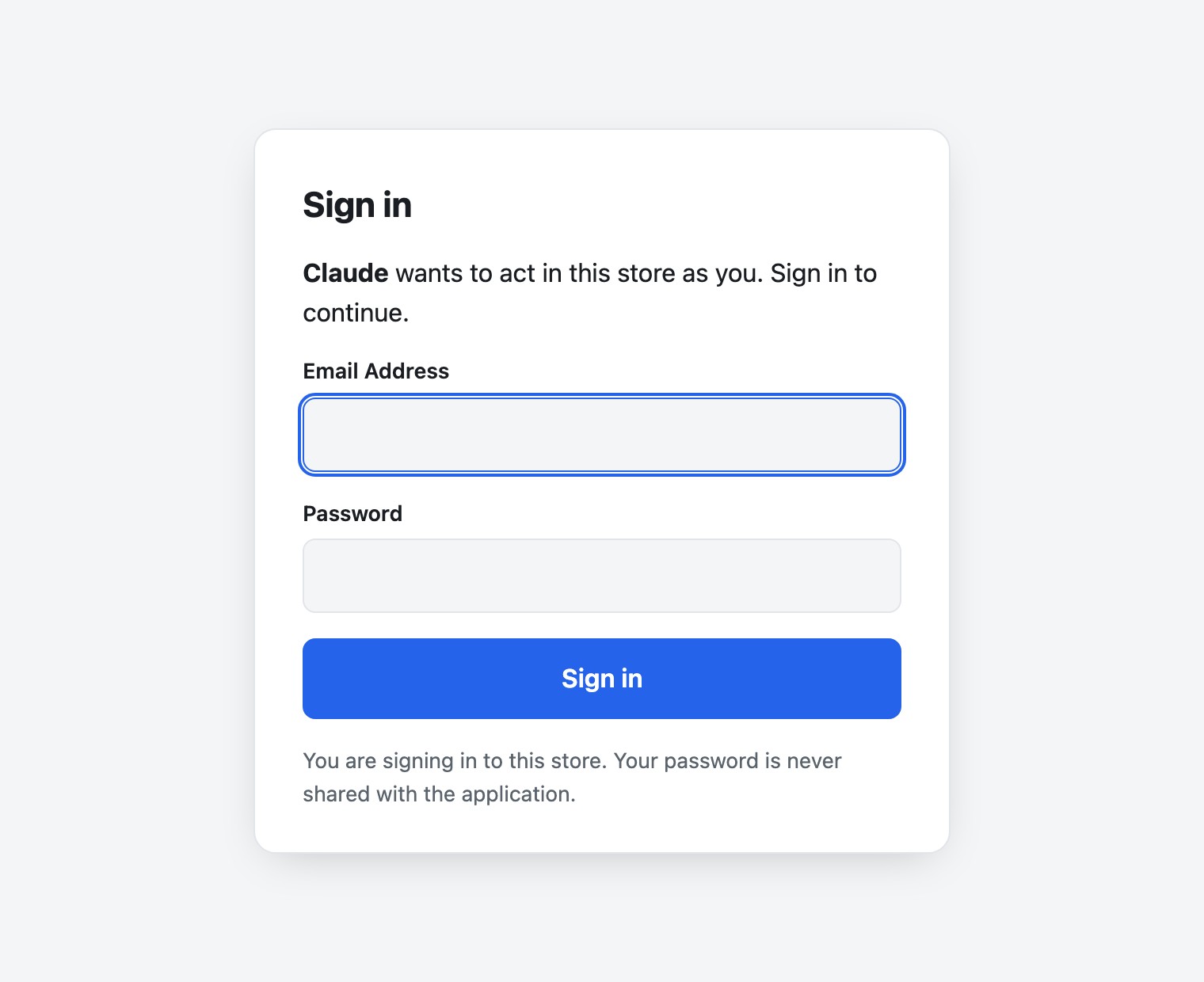
Their browser opens a sign-in card from your store. They sign in with the same e-mail and password they use in your shop. If they do not have an account yet, they make one in the shop first.
-
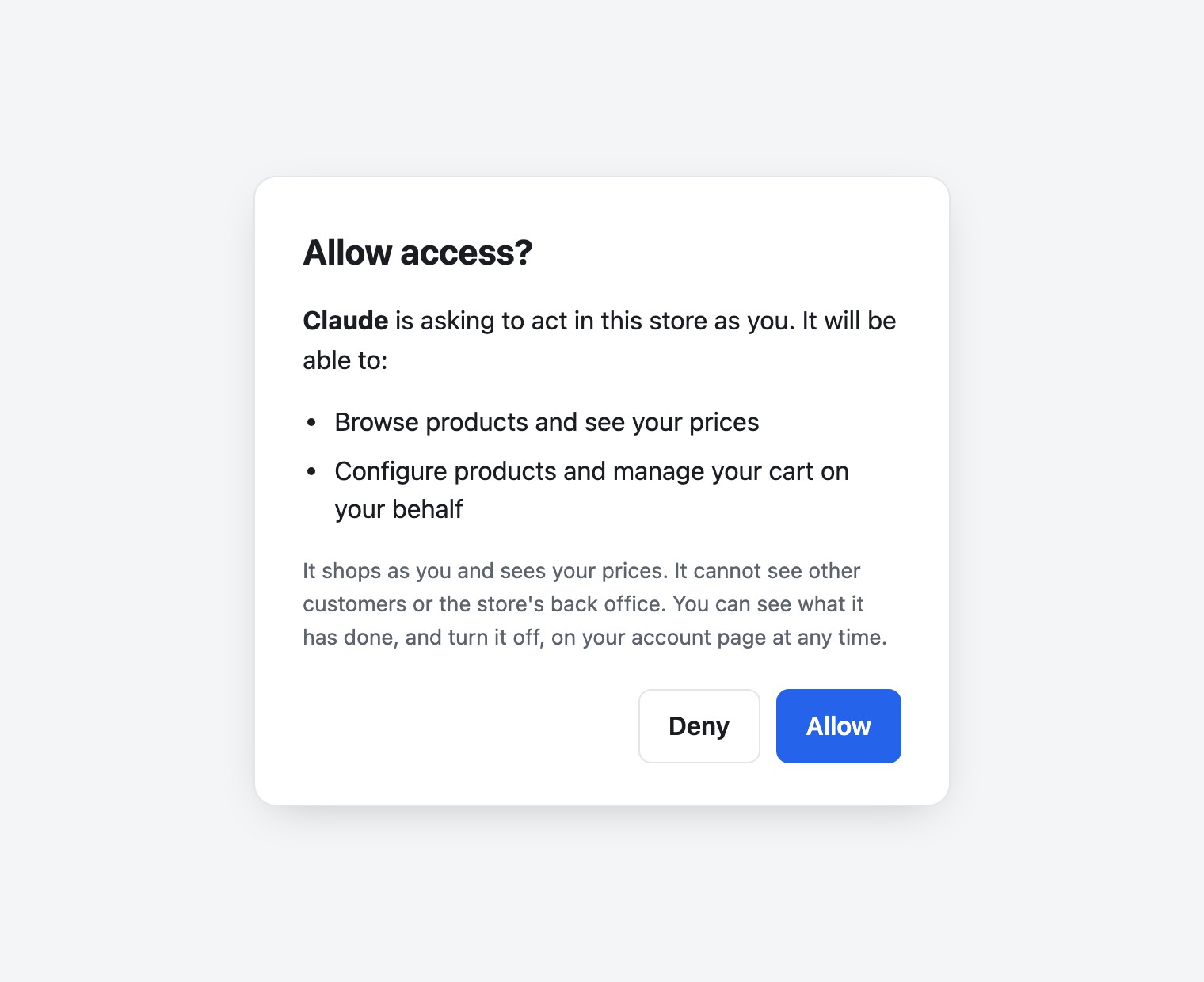
They see a short consent screen naming what the assistant is asking to do — browse, configure, use their cart — and approve it.
-
That is it. From then on the assistant can shop for them until they turn it off.
Their assistant never sees their password. The sign-in happens in their own browser, between them and your store.
What the assistant may and may not do
It may browse your products, configure them, see prices, and use that one customer's cart — add lines, change quantities, copy a line, reopen one to change it, remove one, and save a cart for later.
It may not reach anything else in your store. It cannot see your other customers, your orders, your settings, your catalog behind the scenes, or anything a shopper would not see. That is not a matter of asking it nicely: a customer's access and a back-office access are two different kinds of key, and a key is only ever one of the two.
It cannot check out. The assistant takes the customer as far as a filled cart and hands them a link. Addresses, delivery, payment and the order itself stay on your pages, where the customer does them personally.
Your prices stay your prices
Everything the assistant is told about price comes from the same rules your storefront uses:
- The customer's group pricing applies, exactly as it does when they browse the shop themselves.
- If their group is not allowed to see prices, the assistant is not told the prices — not shown zero, not shown a placeholder. It simply never receives them, so it has nothing to repeat.
- If a product is set to show its total but not what each option adds, that holds here too.
- Net or gross, whichever your store shows that customer, is what the assistant sees.
There is nothing extra to configure and nothing that can drift out of step with your shop, because it is the same pricing, read the same way.
What the customer can see and switch off
On their account page in your shop, each customer sees:
- Connected assistants — which assistants they have given access to, and when.
- Recent activity — what each one has been doing, in plain words: "Chose an option", "Added a configuration to the cart". Looking at things is listed too, not only changing them.
- Turn off — one button per assistant. It takes effect on that assistant's very next attempt.
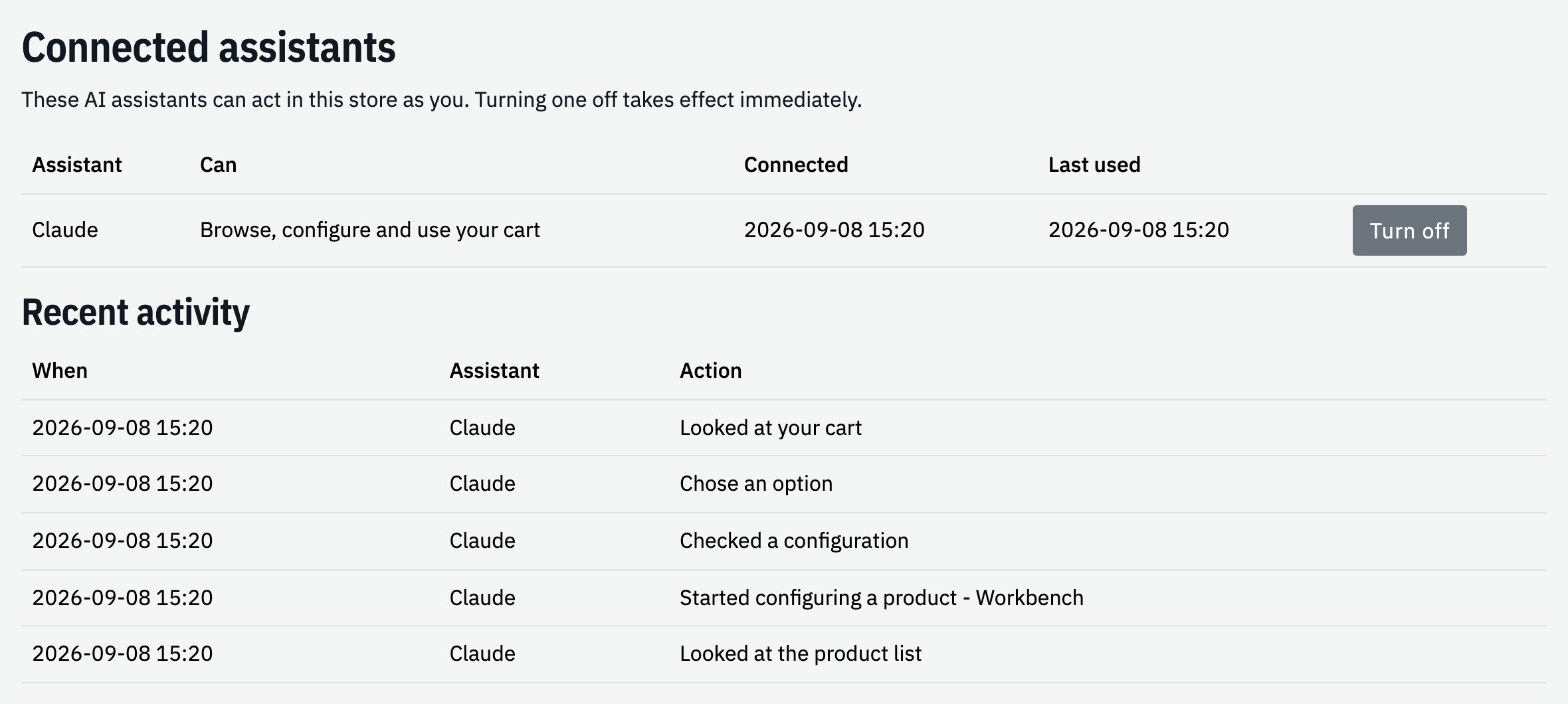
You do not have to do anything for this; it is on their account page already.
What you can see
In CBX → API tokens you can see every access that exists, including the ones customers granted to their assistants, and you can revoke any of them yourself. Each row names the assistant, the customer it acts for, and what it is allowed to do.
The settings
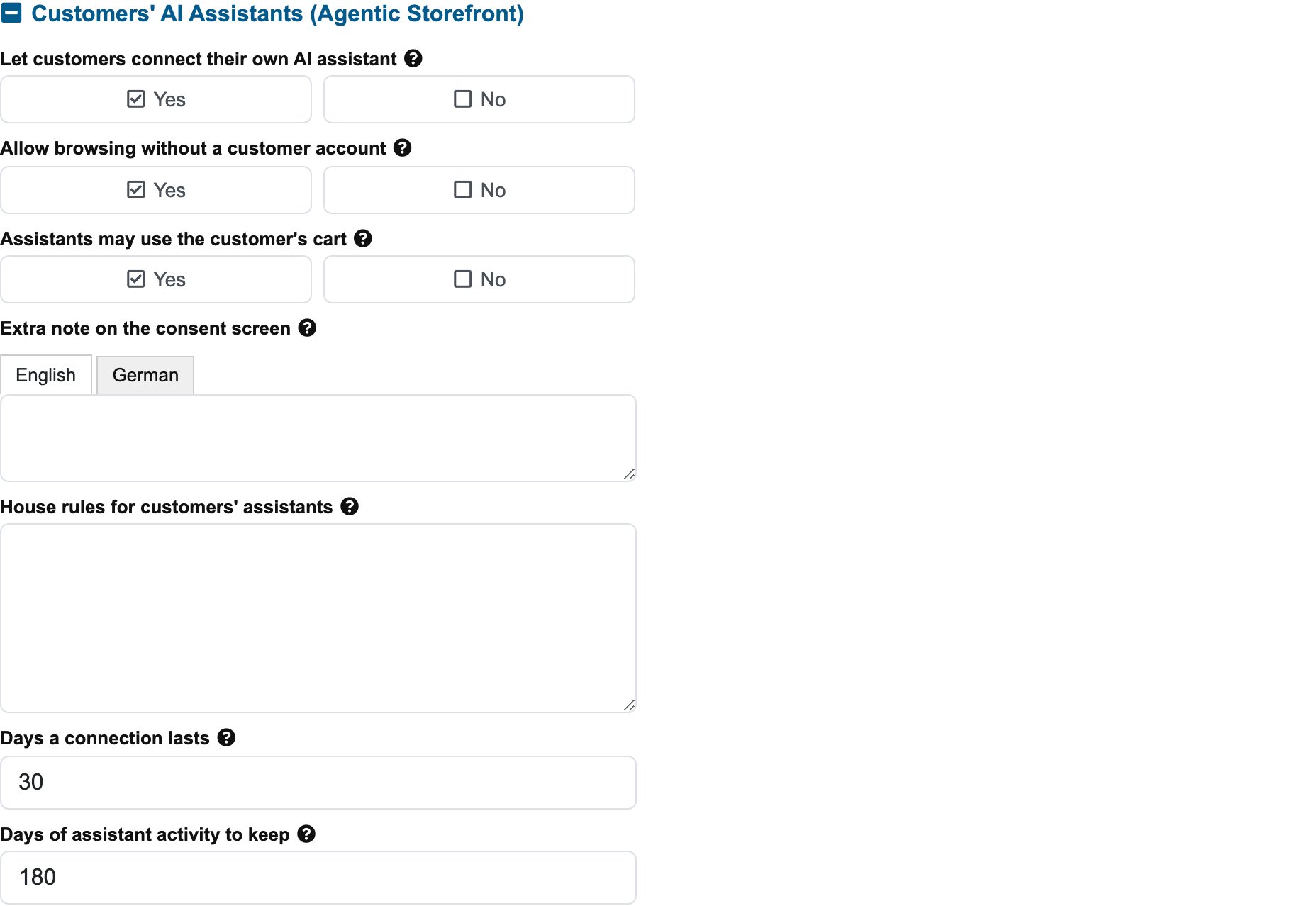
CBX → Settings → Customers' AI Assistants (Agentic Storefront). Everything here ships set the way the feature already behaved, so you only need this section if you want to narrow something.
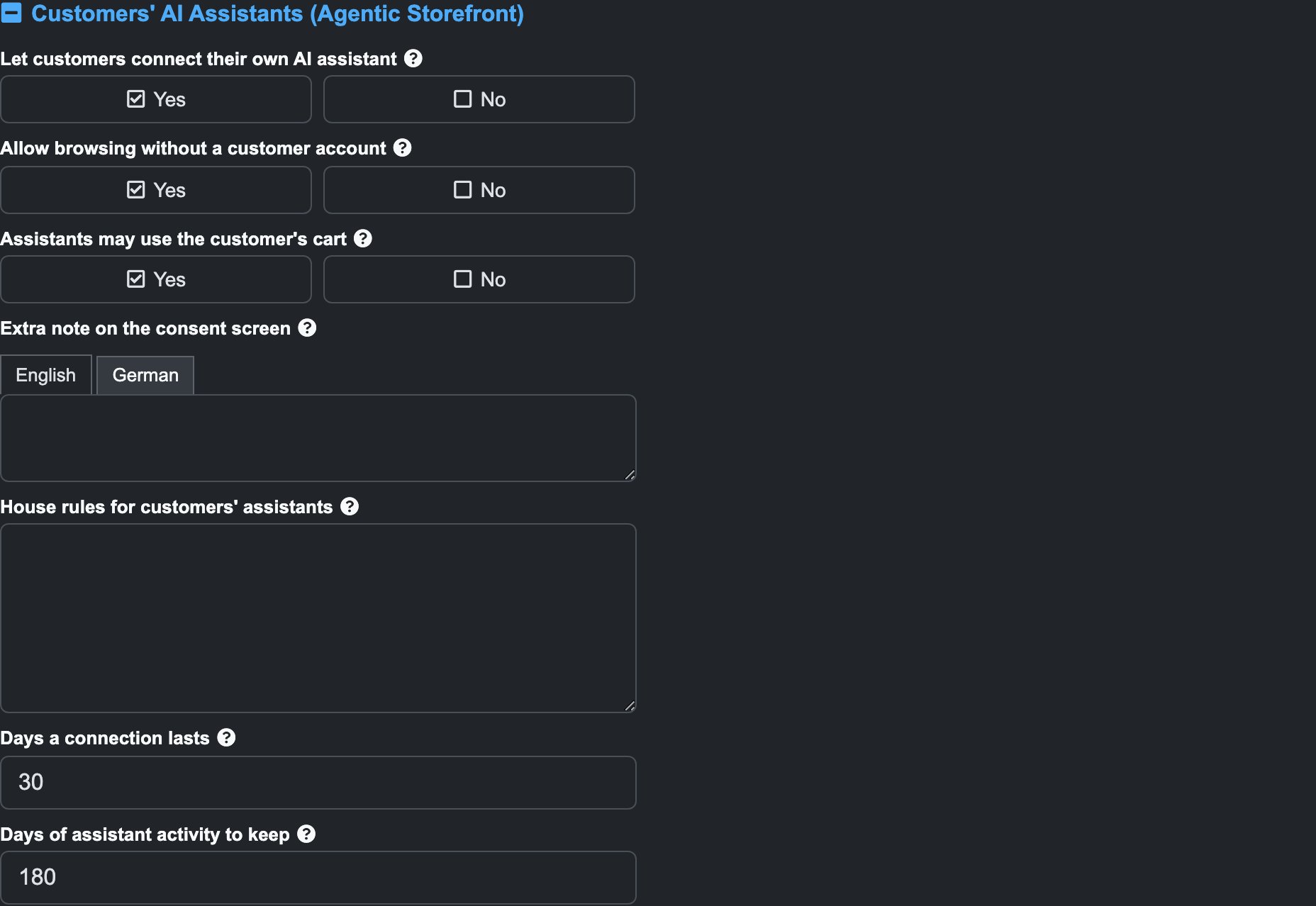
| Setting | What it does |
|---|---|
| Let customers connect their own AI assistant | The main switch. Turning it off closes the door for everyone: existing connections stop working on their next attempt, and no new one can be granted. It does not touch the assistant on your own configurator pages, nor an assistant you connect to the back office. |
| Allow browsing without a customer account | Lets an assistant that is not signed in as anybody look at your catalog, priced as your default customer group is allowed to see it. Always read-only — everyone browsing anonymously shares one account, so configuring or using a cart would let them see each other's work. Turn it off to require a signed-in customer for everything. |
| Assistants may use the customer's cart | With this off an assistant can still browse, configure and say what something costs, but adding to the cart and everything after it is withheld. The customer finishes in the shop themselves. |
| Extra note on the consent screen | Your own sentence, shown to the customer under the standard explanation when they approve an assistant. One per language, because a customer reads it. Leave empty for the standard text alone. |
| House rules for customers' assistants | Your instructions to every connecting assistant — shop facts, what to emphasise, what never to promise. One per line. Applies on top of the Advice for AI assistants you can set on an individual product. |
| Days a connection lasts | How long an approved assistant stays connected. It renews quietly while in use, so this is really how long an unused connection survives before the customer approves it again. |
| Days of assistant activity to keep | How far back the customer's "Recent activity" list reaches. |
Two things worth knowing about the two text fields:
- The house rules are not per language, on purpose. An assistant reads them, not a customer, and it applies instructions written in one language while speaking another to the person it is helping. If you want it to answer in the customer's language, write that as one of the rules.
- A change to the house rules reaches an assistant the next time it connects, not in the middle of a conversation it is already having.
Good to know
- One customer, one basket. An assistant works the same cart the customer sees when they open your shop. Nothing lives in a separate place.
- Reopening a line takes it out of the cart until the assistant puts it back. If a customer says "my item disappeared while the assistant was changing it", that is why — it comes back when the change is finished.
- A saved cart is not a copy. It stays live, so later changes show up in it.
- Access does not last forever. An assistant's permission is short-lived and quietly renewed while it is in use; if a customer stops using it, it lapses on its own.
Related
- Set up the AI product assistant — the one on your configurator pages
- Connect your own AI assistant — an assistant that works for you, in the back office
- Where prices come from