Add answers to a question
- Version
- 4.0 preview
- Updated
Audience: store admins · Scope: the Predefined Answers of a choice question · Last reviewed: 2026-07-20
What this does — Fills a choice-type question (radio buttons, dropdown, checkbox, clickable images) with its selectable answers — each with its own price, image, description, availability and position.
Before you start
- Create the question with a choice type.
- Know each answer's price effect (a fixed surcharge? computed? free?) and have images ready if the question shows pictures.
Steps
-
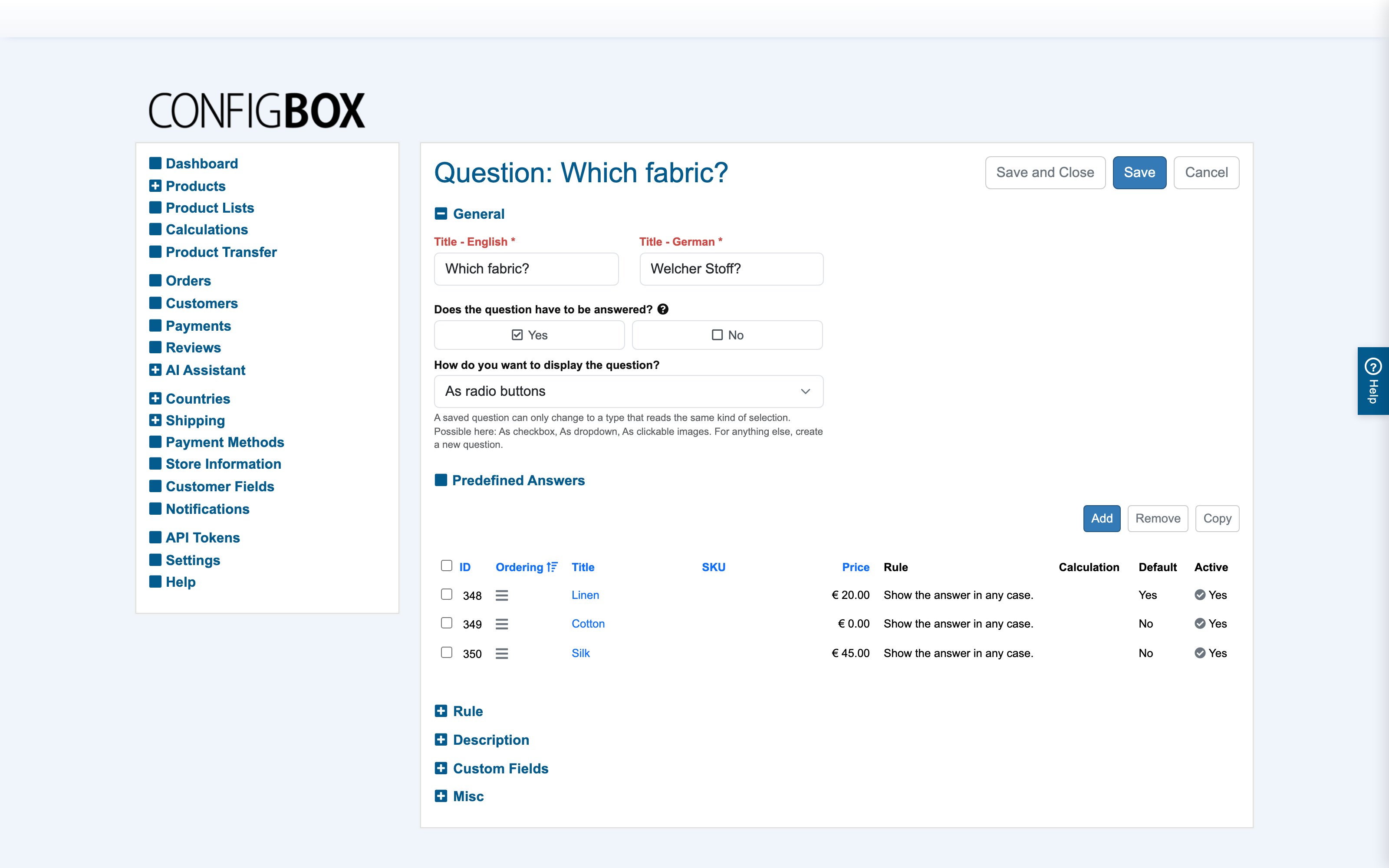
Open the question. In Predefined Answers you see the answer table — ID, ordering handle, SKU, price, title, rule, calculation, default, active:
-
Click Add to create an answer (or tick + Copy an existing one), and fill its form:
- Title — per language; what the customer reads.
- SKU — right under the title: the answer's article number; can be shown on order line items.
- Pricing — Calculated price decides how the answer is priced. No: the answer adds the static Price, and Price Overrides can pin explicit amounts per currency or customer group. Yes: a Price Calculation of this product works out the amount instead, and the static fields make way for the calculation and its overrides. A Was Price shows a struck-through before-price either way.
- Recurring pricing — only for a product that uses recurring pricing: the subscription amount, with its own Calculated recurring price switch, so a calculated one-off surcharge can go with a flat monthly amount and the other way round.
- Weight — what this answer adds to the cart weight (relevant for weight-based shipping), or a Weight Calculation that works it out.
- Default — preselect this answer when the customer arrives.
- Picker Image — the image used in clickable-image questions; a Visualization Image (plus stacking order) is the overlay layer for the product's 2D composite preview.
- Availability: Available switches the answer on/off; Availability date makes it selectable only from a date, and "disable when not available" shows it greyed-out with an "Available on …" note instead of hiding it.
-
Save, and drag the rows into the order customers should see. The Active check in each row publishes/unpublishes the answer in place.
What happens next
Answers show up in the configurator immediately, with their price effects in the live summary. The row's Rule and Calculation columns show at a glance which answers carry conditional visibility or computed pricing.
Good to know
- An answer belongs to exactly one question. To offer the same choice on another question, copy the answer there — the copies are independent afterwards (its price, rule and images can differ per question, which is usually exactly what you want).
- A calculation attached to an answer overrides its static price — see where prices come from.
- A rule on an answer shows/hides that single choice — see build a rule. "Display while disabled" chooses between hiding and greying out.
- Answer custom fields (labels defined in Settings) attach free-form data to an answer that rules and calculations can read — e.g. a "mounting-holes" number a formula uses.
- Deleting an answer that rules or calculations reference is blocked with a message naming the dependency; deactivate instead if you just want it off the storefront.